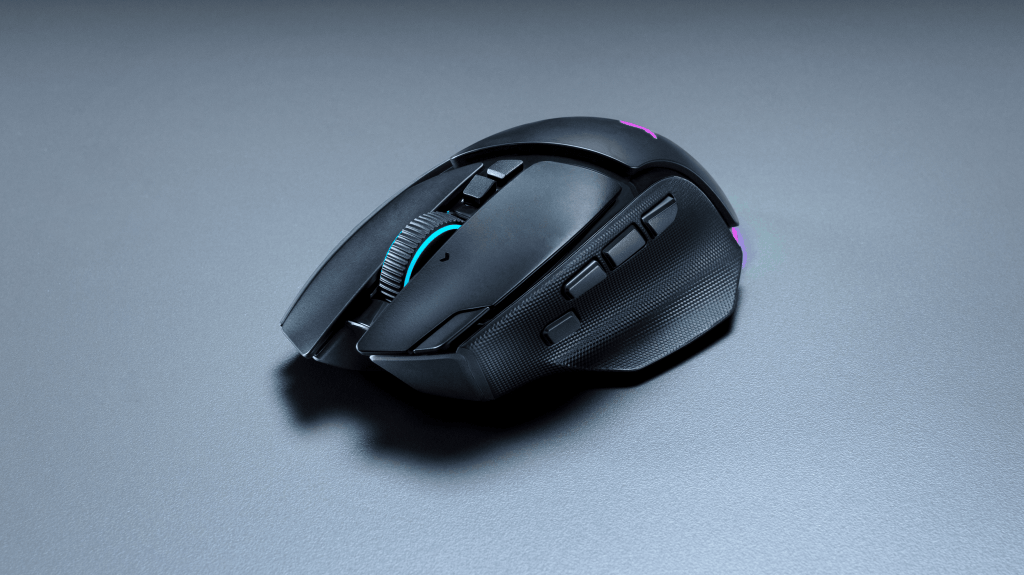
Razer has announced its Basilisk V4 gaming mice, with the wireless V4 Pro and cheaper V4 HyperSpeed both launching today, October 8. The Pro costs a pretty hefty £169.99/$169.99, while the HyperSpeed comes in at £109.99/$109.99. There’s also a new magnetic charging dock, should you want to spend a little more to avoid plugging the mouse in.
The Basilisk V4 Pro keeps the familiar ergonomic shape and thumb rest, but drops to 100g, which is 12g lighter than the V3 Pro 35K. Razer has also repositioned the multi-function trigger and added a third side button and a new button along the edge of the left mouse button, bringing the total to 14 programmable controls.
The scroll wheel gets a few changes, too. Alongside the standard tactile setting and free-spinning mode, the new HyperScroll Tilt Wheel Gen 2 adds Precision Tactile, doubling the number of steps from 24 to 48. Smart-Reel returns as well, automatically switching between tactile and free-spinning scrolling depending on how quickly you turn the wheel. Handy for getting through long documents, or the increasingly unreasonable number of games on your wishlist.
Inside is Razer’s Focus Pro 50K Gen 3 optical sensor and a set of Gen 4 optical switches rated for 100 million clicks. The Pro also supports polling rates of up to 8,000Hz both wired and wirelessly, with no extra dock required. That’s how often it reports its inputs, although how much difference it makes in practice is a question for testing.
What does the extra £60 buy?
Basilisk V4 HyperSpeed vs Basilisk V4 Pro
| Feature | V4 HyperSpeed | V4 Pro |
|---|---|---|
| UK price | £109.99 | £169.99 (+£60) |
| Polling rate | 1,000Hz with included receiver; 8,000Hz with an extra accessory¹ | 8,000Hz wired and wireless, out of the box |
| Scroll wheel | Tactile, free-spin and Smart-Reel | Adds finer 48-step Precision Tactile scrolling |
| Programmable controls | 12 | 14 |
| Optical sensor | Focus X 33K Gen 3 Up to 33,000 DPI | Focus Pro 50K Gen 3 Up to 50,000 DPI |
| Claimed battery life² | 140h wireless 225h Bluetooth | 200h wireless 275h Bluetooth |
| Bluetooth pairing | One device | Up to three devices |
| Weight | 94g | 100g |
¹ The HyperSpeed needs a separately sold Mouse Dock V2 Pro or compatible HyperPolling Wireless Dongle to reach 8,000Hz. The Pro does not need a dock for 8,000Hz.
² Razer’s maximum battery claims. Wireless figures use 1,000Hz polling, not 8,000Hz.
Both include: 2.4GHz wireless, Bluetooth, USB-C wired use, Gen 4 optical switches and Chroma RGB. Both support optional wireless charging; the £59.99 Mouse Dock V2 Pro is sold separately.
For the extra £60: the Pro adds native 8,000Hz polling, finer tactile scrolling, two extra controls, longer claimed battery life and more Bluetooth pairings. The HyperSpeed is 6g lighter. Whether the higher polling rate and sensor figures translate into a noticeable advantage is something for the review.
Source: Razer’s press release and briefing specifications.
Connectivity comes through HyperSpeed Wireless Gen 2, Bluetooth 6.2 or USB-C. Bluetooth can remember three devices, giving you a way to move between different computers without constantly pairing the mouse again. Razer claims up to 200 hours of battery life over HyperSpeed at 1,000Hz, or 275 hours over Bluetooth; that 200-hour figure doesn’t apply to running it at the full 8,000Hz.
As for the Basilisk V4 HyperSpeed, it weighs a slightly lighter 94g and offers a 33K Gen 3 sensor, 12 programmable controls and up to 140 hours of wireless battery life. Its scroll wheel goes without the Pro’s Precision Tactile setting. The HyperSpeed supports up to 1,000Hz polling with its included wireless receiver. To reach 8,000Hz, you’ll need either the Mouse Dock V2 Pro or a compatible Razer HyperPolling Wireless Dongle, both sold separately.
The Pro supports 8,000Hz out of the box.
Both mice support Razer’s wireless-charging ecosystem, including the new Mouse Dock V2 Pro. Priced at £59.99/$69.99, the dock combines magnetic charging with an 8,000Hz wireless transceiver and support for sharing a connection between compatible Razer mice and keyboards so you don’t need two dongles taking up two USB ports.
For the HyperSpeed, it’s a charging option that also unlocks 8K; for the Pro, it’s an optional charging and connectivity accessory, with no extra polling-rate upgrade. It also has RGB lighting, because apparently even the thing charging your mouse needs to join in on the disco.
I’m actually writing this with the Basilisk V4 Pro already under my hand, thanks to a review sample from Razer. My usual mouse is a standard Basilisk V3, so I’m particularly interested in how much of an upgrade it feels like in everyday use. I’ll have a full review coming soon once I’ve spent a bit more time with it.